
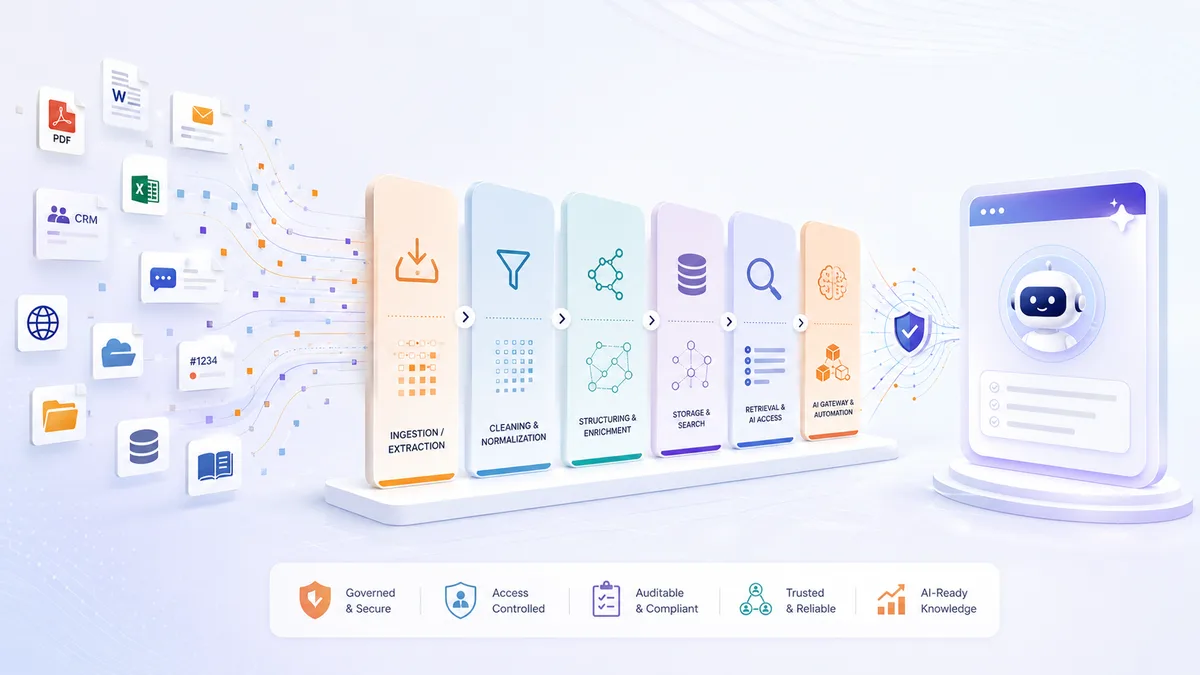
Most established companies already have valuable knowledge. It lives in shared drives, email threads, CRMs, PDFs, presentations, websites, support tickets, reports, and people’s heads. The problem is almost never a lack of information. It is that this information is fragmented, outdated, duplicated, hard to search, and not structured for modern AI tools.
That is why so many AI initiatives stall after the first impressive demo. A chatbot can answer a few prepared questions. It cannot reliably support your business if it has no clean, current, access-controlled, well-structured knowledge to work with. RAG quality is as much a data-engineering problem as an AI problem — and the data-engineering half is the part most teams under-scope.
This article is the reference architecture we use to close that gap: how to turn scattered corporate information into a governed knowledge layer that can power internal assistants, CRM copilots, website assistants, document automation, and repeatable workflows — built in layers, on components you can actually choose. It is the engineering companion to our AI-Ready Corporate Knowledge Systems solution and to the business case for building one.
What “AI-ready” actually means
Before any architecture, agree on the target. Corporate knowledge is AI-ready when it is:
- Clean — duplicates, outdated versions, and contradictions are identified and handled.
- Structured — documents, records, and messages are converted into consistent formats with metadata, entities, and relationships.
- Traceable — every AI-generated answer can point back to the original source document, record, email, or page.
- Access-aware — users and AI tools only ever retrieve information they are allowed to see.
- Searchable by meaning and context — semantic search, keyword search, filters, and relationships all work together.
- Rebuildable — indexes and AI-ready datasets regenerate from original sources, so the system does not silently decay.
- Reusable — the same foundation supports internal search, support, sales enablement, compliance, website assistants, and automation.
Get these right and the choice of model becomes almost interchangeable. Get them wrong and no model, however capable, will rescue the project. The rest of this article is how each property is engineered.
The layered architecture
An AI-ready knowledge system is not one large database or one chatbot. It is a layered solution that keeps existing systems in place while making their information accessible, governed, and useful. Seven layers, each doing one job.
1. Source systems stay authoritative
The system connects to where knowledge already lives — Google Drive, SharePoint, OneDrive, Dropbox; Gmail, Outlook, Zoho Mail; CRM and ERP; websites; PDFs, contracts, and policies; slide decks; wikis and project docs; Git repositories; support tickets; images and diagrams; and reusable prompts and internal guidelines.
The goal is not to migrate everything into a new platform. Existing systems remain the source of truth. The knowledge layer extracts, synchronizes, cleans, enriches, and indexes data from them — which is exactly what makes the index rebuildable.
2. Ingestion and extraction
This layer collects from each source and converts it into usable content: connectors to business applications, website crawlers, PDF and document parsers, OCR for scanned files, email-thread extraction, CRM synchronization, API integrations, scheduled syncs, and controlled manual upload. It has to survive real-world conditions — access rules, rate limits, broken documents, inconsistent naming, and source-specific quirks — so that downstream layers receive clean text.
3. Cleaning and normalization
Raw data is rarely ready for AI. This step removes duplicates, detects outdated versions, normalizes company/person/product/project names, standardizes dates and currencies and languages, strips boilerplate, detects sensitive data, flags low-confidence records, preserves links to sources, and assigns ownership and freshness.
This is the unglamorous work that decides the outcome. Skip it and the assistant retrieves the wrong version of a document, mixes unrelated data, or produces confident answers built on weak context. In practice it consumes 30–50% of project effort — budget for it deliberately, the way we describe in why AI projects fail after the PoC.
4. Structuring and enrichment
Next, unstructured content becomes structured knowledge:
- A PDF report becomes sections, tables, summaries, key entities, and source-linked chunks.
- An email thread becomes participants, dates, topic, decision, next steps, and related account.
- A CRM record becomes a structured entity linked to people, projects, documents, and communications.
- A slide deck becomes extracted text, visual descriptions, tags, and searchable sections.
- A web page becomes clean content with metadata, publication date, source URL, and topic.
- A prompt becomes a reusable asset with purpose, inputs, expected output, owner, and version.
This is where the system moves from “document storage” to “corporate knowledge.”
5. Storage built for the job
Different information needs different storage. The common mistake is forcing everything into one shape.
| Need | Typical storage or format |
|---|---|
| Original files, PDFs, images, decks | Object storage |
| Structured business records | SQL (relational) database |
| Flexible extracted metadata | JSON / JSONB |
| AI-searchable text chunks | Vector database |
| Keyword and filtered search | Search index |
| Relationships between people, companies, documents, projects | Graph database |
| Prompts, guidelines, authored knowledge | Markdown / MDX |
| Configuration and taxonomies | YAML |
| API-ready structured records | JSON / JSONL |
You do not need every component on day one. A pragmatic first version starts with a relational database, object storage, and vector search. A graph database or a dedicated search engine is added later, when real use cases justify it — not because an architecture diagram has a box for it.
6. Retrieval and AI access
This is the layer AI tools actually use, and the only interface they should talk to. It supports semantic search, keyword search, metadata filtering, source citations, access-aware retrieval, relationship-based discovery, freshness checks, ranking and reranking, context assembly for the model, and API access for other applications.
The discipline that matters most here is hallucination prevention by architecture, not by prompting: current data, source attribution on every answer, access controls that respect user permissions, and no conflicting document versions. If the 2023 policy and the 2025 revision are both indexed without version management, the model will synthesize both. We built exactly this for a hydrogen and renewable energy client — strict source architecture, access controls, and version management delivered 100% domain accuracy and zero hallucinations (read the case).
7. AI gateway and automation
Once the knowledge layer is ready, models and workflows connect safely behind a gateway: provider routing, cost and usage controls, prompt management and versioning, evaluation and testing, human-approval steps, workflow automation, logging and monitoring, feedback collection, and integration with CRM, email, website, ticketing, or internal systems. This is what turns a knowledge base into an operational AI system rather than a clever search box.
The functional core: access, clean, augment, restructure
Most of the value — and most of the engineering — lives in how raw, mixed-quality data becomes something an AI can use. The same four-step pipeline handles wildly different inputs.
| Data type | What happens to it |
|---|---|
| Web pages & scraped sites | Crawled, converted to clean text, de-noised, dated, embedded |
| PDFs, reports, publications | Parsed (incl. scanned/OCR), tables extracted, chunked, summarized |
| Emails | Threaded, de-duplicated, PII-tagged, linked to people and accounts |
| CRM records (companies, people, deals) | Synced as structured entities and as graph relationships |
| Slide decks & presentations | Text and structure extracted; visuals captioned and indexed |
| Images & design files | Stored as files; described and tagged so they’re searchable by meaning |
| Prompts, guidelines, playbooks | Versioned as text; reusable and retrievable as first-class assets |
The output is uniform, versioned, and source-linked regardless of how chaotic the input was.
Two component paths: open-source and commercial
You do not have to choose all-or-nothing. Most successful builds blend the two — open-source for the core where data sovereignty matters, managed services where speed and reliability are worth a predictable fee.
Open-source-first
For strong control, data sovereignty, and low licence cost:
- PostgreSQL for structured business data and metadata — with
pgvectorit can also serve vector search, and with extensions, graph workloads too. - Qdrant, Weaviate, or Milvus for dedicated vector search at scale.
- OpenSearch for keyword and hybrid search.
- Neo4j Community (or similar) for relationship-heavy use cases.
- MinIO or any S3-compatible store for original files.
- n8n, Airbyte, or similar for ingestion and workflow automation.
- Apache Tika, Unstructured, OCR tools, and web crawlers for document and web extraction.
- LiteLLM or a similar gateway for model routing and cost control.
- Langfuse or similar for prompt tracing and evaluation.
- OpenMetadata or DataHub for cataloguing, ownership, and lineage.
The trade-off: lower licence cost, better control, flexible deployment, and reduced lock-in — paid for in DevOps responsibility, setup, and maintenance. It works best when the organization has technical capacity or a trusted implementation partner to operate it properly.
Managed commercial
A commercial path does not have to mean an expensive enterprise platform. Many companies combine affordable managed services with custom integration: managed PostgreSQL; managed vector databases (Qdrant Cloud, Pinecone, Weaviate Cloud); managed search (e.g. Azure AI Search); commercial document-parsing and OCR APIs; managed crawling and extraction; hosted workflow automation; commercial model APIs for embeddings and generation; managed observability; and cloud storage with backup, encryption, and access control.
The trade-off: faster time to value and far less to operate — in exchange for recurring cost, vendor dependency, and a data-processing and compliance review you must actually do.
The pragmatic default is hybrid
Keep core business knowledge and metadata in a controlled database. Store original files in secure object storage. Use open-source where customization and control matter. Use managed APIs for parsing, embeddings, or search when they save significant time. Keep the architecture modular so components can be replaced, and avoid locking the whole solution into one vendor too early. Begin open-source and graduate specific components to commercial services as volume grows — the architecture does not change.
Not sure which path fits your data and compliance regime? Our Product Pilot audits your sources, data quality, and first use case, then delivers a phased architecture with component choices and estimates — written by the engineers who would build it. Fixed scope, senior engineers from day one.
→ Book a Product Pilot
Governance is part of the architecture, not a policy document
In regulated environments, “just add AI” on top of disorganized data creates risk instead of value. The controls that make a knowledge system trustworthy are structural, not procedural:
- Source traceability — every important answer cites the document, record, or page it came from.
- Access-aware retrieval — the system respects roles, permissions, and sensitivity at query time; AI never becomes a way around existing access controls.
- Sensitive-data handling — PII and regulated data are detected, tagged, and routed for special treatment (de-identification, in-region storage) before they ever reach an index.
- Audit logs and evaluation — decisions and retrievals are logged; evaluation datasets measure whether answer quality is improving or degrading over time.
- Freshness and ownership — content has owners and freshness status, and stale material is caught rather than served.
Designed in from day one, these are cheap. Retrofitted after launch, they are what blows the budget — and in fintech, healthcare, or energy, they are what a security review or regulator will actually test.
A reference implementation, in phases
A good implementation does not try to organize all corporate knowledge at once. It starts with a thin, valuable slice and expands.
- Discovery and prioritization. Map source systems, document types, owners, access and compliance constraints, and outdated content. Select one high-value first use case, define success metrics, and choose the initial architecture.
- Knowledge foundation. Set up secure storage, configure connectors, parse and normalize selected documents, define metadata standards, build the first vector index and retrieval API, and add source traceability and basic access control. By the end, users get answers grounded in real content, with links to sources.
- First production use case. Build one assistant or automation, connect models through the gateway, add prompt templates and human review where needed, log usage and feedback, and tune retrieval and ranking. Narrow enough to control risk; useful enough to prove value.
- Expansion and integration. Add sources, integrate email/CRM/ticketing, introduce hybrid search and reusable prompt libraries, add entity relationships and graph navigation, and build role-specific assistants.
- Governance and continuous improvement. Add data-quality checks, stale-content monitoring, audit logs, evaluation datasets, accuracy measurement, verified-answer promotion, and scheduled index rebuilds. This is what makes the system production-ready and self-improving.
Good first use cases include an internal knowledge assistant, a website assistant on approved content, a CRM copilot, document intake and classification, compliance or policy search, a proposal/RFP assistant, or a customer-support knowledge assistant. The goal of the first phase is trust, not coverage.
What the first project can look like
A practical first engagement connects three to five important sources, extracts and cleans selected documents and records, builds the first AI-ready index with metadata and access rules and source traceability, implements one assistant or workflow, tests it with real users, measures answer quality and usefulness, and produces a roadmap for expansion. That gives you a working foundation without committing to a large platform build before you have proof.
If you have years of scattered documents, emails, reports, CRM records, and operational knowledge, the right first step is not another isolated AI experiment. It is making that knowledge accessible, structured, governed, and ready for reuse — once — so every AI initiative after it gets faster and cheaper.
Frequently Asked Questions
Do we have to replace our existing systems — Drive, SharePoint, CRM — to build this?
No. The whole point of the architecture is that your existing systems stay authoritative. The knowledge layer syncs from them — extracting, cleaning, structuring, and indexing selected content — rather than migrating everything into a new platform. That is also what keeps the index rebuildable: nothing important lives only in the index.
Do we need a vector database and a graph database from day one?
Usually not. A pragmatic first version runs on a relational database (Postgres, often with pgvector for embeddings) plus object storage for files. A dedicated vector store or a graph database is introduced later, when real use cases and scale justify it — not because an architecture diagram has a box for it. Starting minimal is cheaper and faster to trust.
How do you stop the assistant from hallucinating on our internal data?
By architecture, not by prompt wording. That means indexing only current data, attaching a source citation to every answer, enforcing access controls at retrieval time, and managing document versions so conflicting copies are never both retrievable. When the 2023 policy and the 2025 revision are both indexed without version control, the model will synthesize both — version management prevents it.
Open-source or commercial components — which should we choose?
Most successful builds are hybrid. Use open-source for the core where data sovereignty and customization matter (Postgres, MinIO, open parsing and orchestration tools), and managed services where they save real time (document parsing, embeddings, managed vector stores). Keep the architecture modular so components can be swapped, and graduate from open-source to managed as volume grows without redesigning.
How much of the work is data cleaning versus AI?
Most of it is data work. Deduplication, version detection, normalization, metadata, access mapping, and source traceability commonly consume 30–50% of project effort. AI model and embedding usage is typically the cheap part. Projects that under-scope the data work are the ones that overrun — which is why we treat data quality as the project, not a prerequisite.